Export Models

From PHENOM Portal Knowledgebase
Revision as of 11:07, 27 April 2026 by Chris (talk | contribs) (Created page with "This article is an abridged combination of Projects and Models Management and Data Model Generation intended to help users export their models from PHENOM. == Select the Model == The unabridged article can be found here: Projects and Models Management#Projects Management. # Left-Click the Manage Models button. <br/> 76px|alt=Manage Models mode button|Manage Models mode button # Find the desired project in the project lis...")
(diff) ← Older revision | Latest revision (diff) | Newer revision → (diff)
Jump to navigation Jump to search

This article is an abridged combination of Projects and Models Management and Data Model Generation intended to help users export their models from PHENOM.

Select the Model

The unabridged article can be found here: Projects and Models Management#Projects Management.

  1. Left-Click the Manage Models button.
    Manage Models mode button
  2. Find the desired project in the project listing.
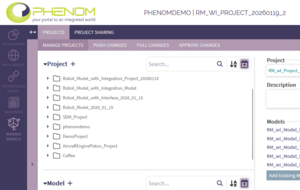
    List of User's Projects
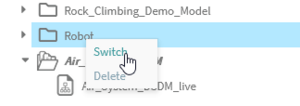
  3. Right-click on the project and click "Switch" to activate that project.
    PHENOM Header
  4. Verify the intended model is active in the PHENOM header.

    PHENOM Header

Export the Data Model

The unabridged article can be found here: Data Model Generation.

  1. Left-Click the Generate button.
    Generate